Always in sight on your Lock Screen, Home Screen & Dynamic Island
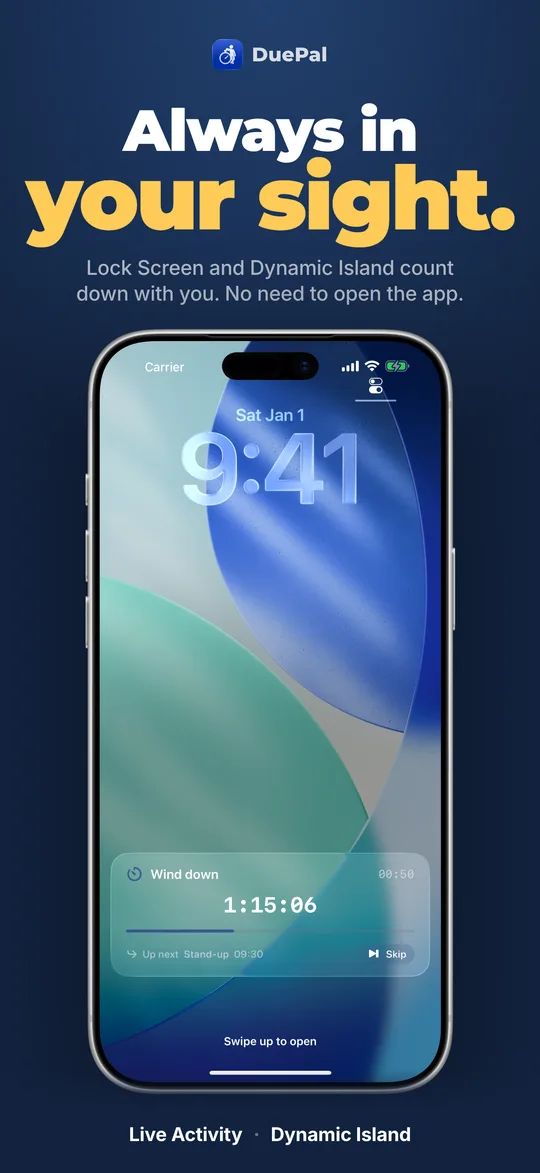
You never have to remember to open DuePal. Your next due sits right on your Lock Screen, Home Screen widgets in every size, Control Center, and Dynamic Island — and rings as a real alarm on iOS 26+ when enabled.
Honest Free vs Premium Lock Screen Breakdown
Clear answer to "do I have to pay for Lock Screen countdowns?"
| Surface | Free Tier | DuePal Premium |
|---|---|---|
| Current Due Home & Lock Screen Widget | Included free (up to 2 active dues) | Unlimited dues + all 12 color themes |
| Countdowns Widget (Dates Ahead) | 2 date countdowns inside app | Countdowns Home & Lock Screen widget unlocked |
| Live Activity & Dynamic Island | Premium for new installs (build 14+) | Full live ticking + Skip & Up-Next line |
| Ring as System Alarm (iOS 26+) | Standard heads-up & due notifications | Real system alarm even in Silent mode + Repeat Until Done |
Frequently Asked Questions
Do you need Premium for Lock Screen countdowns in DuePal?
The Current Due Home Screen and Lock Screen widget is free for everyone. Starting from build 14, the continuously ticking Lock Screen Live Activity and Dynamic Island (with Skip button) require DuePal Premium; earlier paid or pre-build-14 installs keep what they had.
Can DuePal ring even if my iPhone is on Silent or Focus mode?
With DuePal Premium on iOS 26 and later, dues can ring as real system alarms that break through Silent mode, complete with Snooze right on the alarm. On earlier iOS versions or without alarms enabled, you receive Time-Sensitive style notifications with Done and Snooze actions.
What is the difference between a widget and a Live Activity?
iOS widgets sit on your Home Screen and Lock Screen and show your current due or countdowns at a glance. Live Activity and Dynamic Island sit across the top of the screen and Lock Screen during an active due with live second-by-second countdown and a Skip button.